OpenList Debug: WebUI browsing or downloading outdated files due to browser cache
While using OpenList, the author accidentally discovered that a PDF file consistently downloaded an outdated version, even after multiple re-uploads. After a thorough inspection, it was concluded that the issue was caused by the browser cache, and a solution was provided. Hence, this record was made.
Issue URL: https://github.com/OpenListTeam/OpenList/issues/1550
Problem Description
In the WebUI, after a user uploads a new version of a file, they still see the outdated file content when viewing or downloading it through the browser.
Reproduction Status
Consistently reproducible. Successfully replicated and tested using both Edge and Firefox.
Reproduction Steps
- Upload test.png via the web page.
- View or download test.png via the web page.
- Upload a new version of test.png, overwriting the old version. (either by deleting and re-uploading, or directly selecting the overwrite option during upload)
- View or download test.png again.
- Observe that the test.png displayed is the old version.
Root Cause
The issue is caused by browser caching.
Trigger Conditions
- The file's size and format are cacheable by the browser.
- The old version of the file was recently viewed or downloaded online, and the browser cache still exists and remains valid.
- After the new version overwrites the old one, attempting to view or download the file again triggers the issue, resulting in the old version being served.
Root Cause Verification
After testing and verification, the core issue appears to be that the backend's response to GET file requests does not include the Cache-Control header, as shown in the figure:
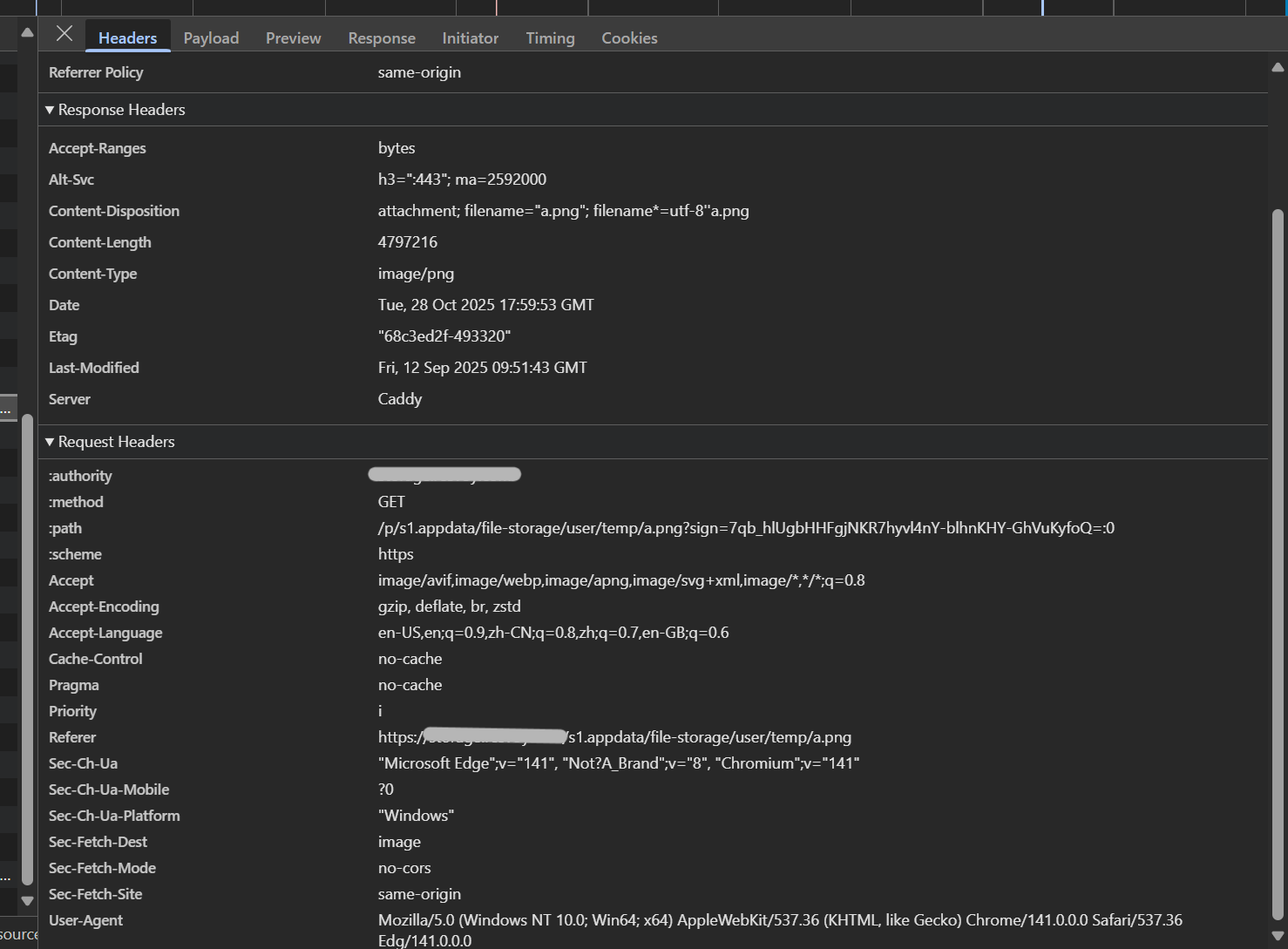
The Cache-Control shown in the figure is located in the request header, which is automatically added by the browser. However, the Cache-Control header is absent in the response header returned by the backend.
To verify this, the following configuration was applied to Caddy:
    handle @storage {
        reverse_proxy http://127.0.0.1:15244 {
            header_down Cache-Control "no-cache"
        }
    }
Among these, header_down Cache-Control "no-cache" is the added content.
After applying the configuration, packet capture revealed that the response header now includes Cache-Control: no-cache, as shown in the figure below:
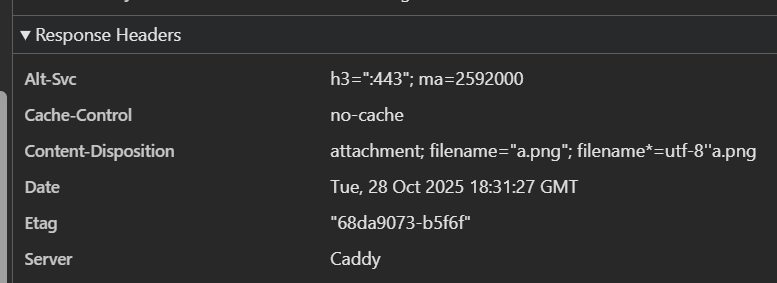
After repeating the reproduction steps described in the issue above, it was found that the problem has been resolved, and the browser can now correctly display or download the latest version of the file.
Suggested Temporary Solution
Add Cache-Control: no-cache to the backend response at the reverse proxy. Using Caddy as an example:
    handle @storage {
        reverse_proxy http://127.0.0.1:15244 {
            header_down Cache-Control "no-cache"
        }
    }
Suggested Solution
When the OpenList backend returns a file via GET request, including the response header Cache-Control: no-cache will resolve this issue.